An AI Support Concierge is an AI support agent that automatically resolves inbound customer queries, retrieves live customer data from connected systems, deflects Tier 1 tickets, and escalates complex issues to humans with full context — across web, phone, WhatsApp, and email.
In simple terms:
An AI Support Concierge sits before your support queue. It answers questions, retrieves live account data from your connected systems, resolves issues without a human agent, and only escalates when genuinely needed.
| Quick definition | An AI Support Concierge resolves inbound queries automatically, retrieves live customer data from connected systems, deflects Tier 1 tickets, escalates with full context, and tracks CSAT — so your support team handles less volume and higher-value work. |
|---|---|
| Best for | Businesses with inbound support volume — from small teams to growing operations — that want 24/7 coverage and faster resolution without proportionally growing their team. keum.ai even offers a free forever tier with no credit card required. Paid plans start at just $30/month with unlimited agents. |
| Typical outcome | Teams using keum.ai’s AI Support Concierge resolve up to 80% of Tier 1 support tickets automatically, reducing agent workload and improving CSAT. |
| Not the same as | A generic FAQ chatbot that only answers scripted questions without connecting to your systems, or a help desk like Zendesk that manages tickets after they arrive — without resolving them automatically. |
What problems does an AI Support Concierge solve?
Most support teams do not have a ticketing problem first. They have a volume problem — the same billing, product, appointment, password, and status questions arriving every day across every channel. Agents answer them manually, look up account data in separate systems, and start every escalation from scratch. An AI Support Concierge sits before the ticket queue: resolving common issues, retrieving live customer data, and executing actions in connected systems — before any of it becomes manual work.
What is an AI Support Concierge?
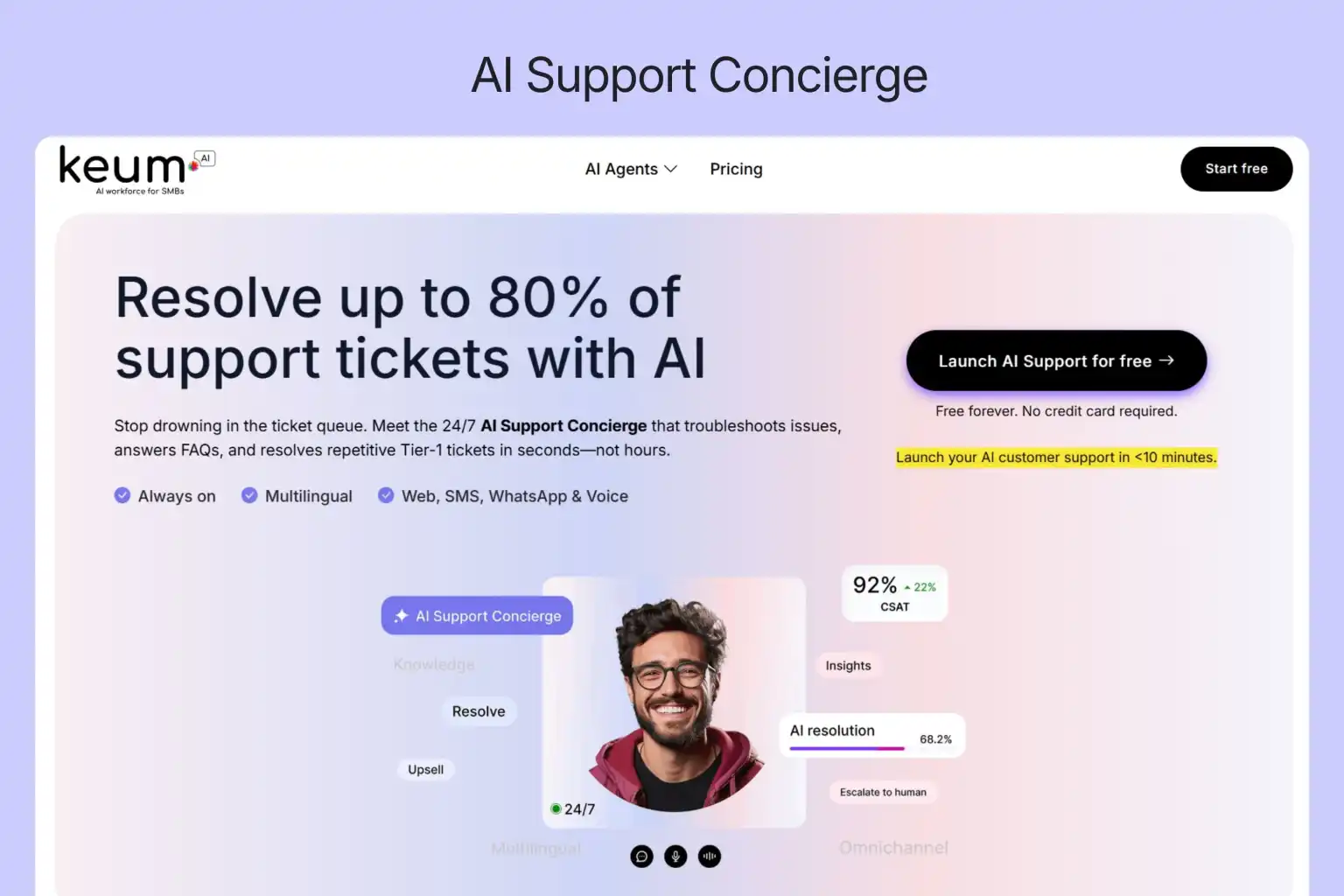
An AI Support Concierge is a specialised inbound support agent. Its job is to respond when a customer has a problem, draw on your approved knowledge base or connected systems to resolve it, and either close the issue automatically or route it to a human with full context.
The word concierge is deliberate. A concierge does not tell guests to submit a form and wait. In a support context, that means active resolution — triage, system lookup, knowledge-grounded answer, action execution, clean escalation — not passive ticket capture.
Most teams searching for an AI support agent find tools that handle one channel or one function. An AI Support Concierge is the full-stack version: live system integration, knowledge-grounded resolution, ticket deflection, escalation with context, and CSAT tracking in a single deployment — complete support automation from first contact to resolution. It is the primary layer of support automation for businesses with significant inbound query volume.
According to Gartner, AI agents are projected to reduce customer service operating costs by 30% by end of 2026. For businesses spending $18–$35 per ticket on manual resolution, that reduction compounds quickly at scale.
Who it is for
- Support and operations teams with inbound query volume across website, phone, WhatsApp, email, or in-person channels
- Small and midsize businesses that cannot staff 24/7 support — keum.ai deploys in under 10 minutes, requires no developer, and has a free-forever plan with no credit card required
- Teams that want to reduce Tier 1 volume and free human support agents for complex, relationship-critical work
- Businesses operating across multiple languages, channels, or time zones need consistent resolution quality
- Businesses that want to intelligently upsell and cross sell to customers during routine interactions.
Who it is not for
- Teams looking primarily for outbound sales automation — that is the AI SDR category
- Support processes where every first-touch interaction must be handled manually for compliance reasons
How an AI Support Concierge works
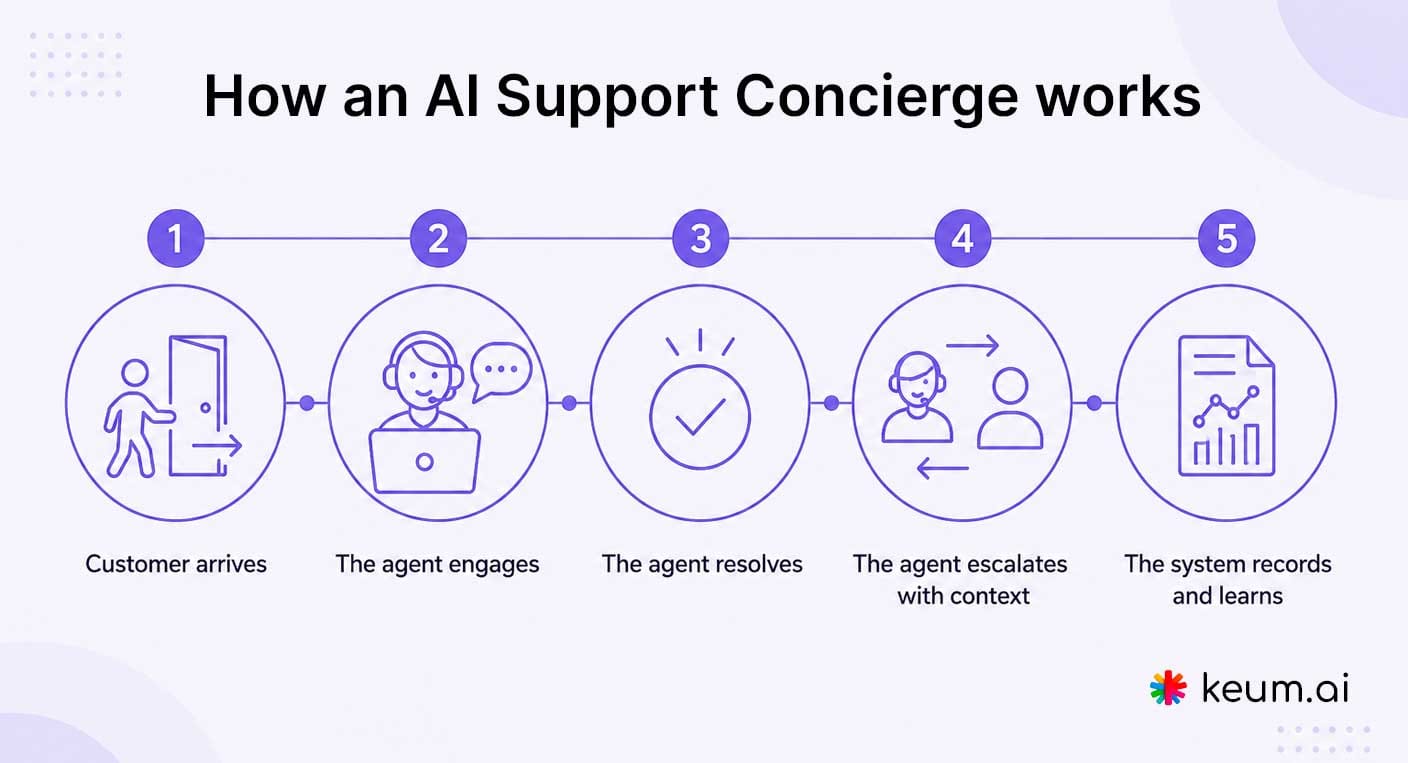
Every experience follows the same five-step flow regardless of channel.
1. Customer arrives
The trigger can be a website visit, inbound phone call, WhatsApp message, email, QR code scan, or kiosk tap. The agent begins its triage process the moment contact is made — using the entry channel and opening query to shape a contextually relevant response rather than a generic greeting.
2. The agent engages
Instead of routing the customer to a queue, the agent classifies the query in real time and opens a relevant conversation. A billing query gets a different opening than a technical how-to. The goal is a precise, relevant response from the first message.
3. The agent resolves
Resolution works at two levels. For knowledge-based queries — how-to questions, policy FAQs, product documentation — the agent draws on your approved knowledge base. For queries requiring real customer context, it connects to your integrated systems: an order status question triggers a lookup against your e-commerce platform; a billing query pulls the account record from your CRM; an appointment question retrieves booking history from your scheduler. The agent can also execute actions — logging a case, updating a record, booking an appointment, triggering a workflow — inside connected systems without human involvement. The majority of Tier 1 tickets are resolved at this stage. Issues outside scope escalate with full context.
4. The agent escalates with context
When a human is needed, the agent hands off the full conversation history, resolution steps attempted, and live data already retrieved — all bundled into a structured context package. The human arrives briefed, not starting from scratch. Live chat handoff is available for real-time transfer.
5. The system records and learns
After each resolution, CSAT is collected automatically and conversation data pushes into your CRM. Knowledge gaps surface in the support dashboard for one-click human review and approval — so the same gap never costs a customer twice.
Why this matters
The goal is not to replace support agents — it is to resolve the issues that do not require one, so the human support agents you have can focus on complex problems, sensitive conversations, and relationship-critical interactions.
4 in 5 Tier 1 tickets
Typical Tier 1 deflection rate for keum.ai customers
With a well-maintained knowledge base, keum.ai’s AI Support Concierge resolves up to 80% of Tier 1 tickets automatically — meaning 4 in 5 common queries are handled without a human agent, ticket queue, or additional headcount.
Before and after: What changes
| Without an AI Support Concierge | With keum.ai’s AI Support Concierge |
|---|---|
| Customers wait until business hours | 24/7 instant support on any channel |
| Agents look up account data manually during every call | AI Agent retrieves live customer data from connected systems instantly |
| Same Tier 1 questions repeat all day | AI resolves common queries automatically |
| Escalations arrive with no context | When escalated, human agents receive a full briefing — context bundle attached |
| CSAT tracked separately or not at all | CSAT collected automatically after every resolved interaction |
Core capabilities
A purpose-built concierge combines capabilities that generic AI chatbots and static help desks do not. These are the ones that determine resolution quality in practice.
Ticket deflection
The majority of Tier 1 tickets resolved automatically at the point of contact. The agent matches incoming queries against your approved knowledge base and closes standard issues immediately — no queue entry, no human required. Deflection rate compounds over time as knowledge gaps are identified and filled.
Live system integration — context retrieval and automated actions
The capability that separates a support concierge from a FAQ bot. Consider the most common support query: “Where is my order?” A chatbot looks for that answer in a document and finds nothing. An AI Support Concierge connects to your order management system, retrieves the live delivery status for that specific customer, and responds with the actual update — no human lookup required, no redirect to a tracking page.
The same logic applies across every account-specific query: a billing question pulls the customer’s account record from your CRM; an appointment question retrieves booking history from your scheduler; a subscription query checks their plan in real time. Beyond retrieval, the agent executes actions — log a case, update a record, book an appointment, trigger a workflow — inside connected systems without involving a human. The customer gets a real answer and a real outcome.
A chatbot that can only answer questions a customer already knows where to find is a search function with a conversational wrapper. An AI Support Concierge that retrieves live data and executes actions is a support agent.
Knowledge-grounded answers
The agent answers only from your approved sources — product docs, SOPs, FAQs, and plain-text uploads — never from general web knowledge. For healthcare, financial services, and legal queries this is essential: every answer stays accurate, consistent, and within compliance scope.
Omnichannel coverage
The same resolution and escalation logic operates across web chat, phone, WhatsApp, email, QR codes, and kiosk deployments. A customer who starts on your website can continue on WhatsApp without repeating themselves — full context travels with them.
Escalation with context
When a human is required, the agent routes with the full conversation history and a structured context bundle attached. Human agents arrive already briefed. Live human chat handoff moves conversations instantly for teams needing real-time transfer.
Assist human agents
Once a query is escalated to a human agent, the AI Concierge shifts its focus from customer support to assisting the human agent, thereby enabling faster and smarter response resolution.
CSAT scoring
Sentiment is tracked in real-time and customer satisfaction collected automatically after every resolved interaction — no separate survey tool, no manual follow-up. CSAT scores sit alongside resolution rate and deflection data in the support dashboard.
Support dashboard
Resolution rate, deflection percentage, CSAT scores, conversation volume by channel, and escalation rate in a single real-time view. Weekly review identifies the knowledge gaps most worth closing first.
CRM and help desk integration
Conversation summaries, CSAT scores, verified contact details, and resolution status push directly into HubSpot, Salesforce, Zoho, Freshdesk, or Zendesk after every interaction. Structured context at handoff — not a raw chat log to parse.
Continuous learning with human-in-the-loop training
When the agent cannot answer with confidence, it flags the gap for human review. One click updates the knowledge base and the fix goes live immediately — approved by a human before it reaches customers. Every resolved gap improves future responses.
Multilingual support and contact verification
The agent serves customers in their preferred language without separate deployments. Email addresses and phone numbers are validated during the conversation, filtering invalid contacts before they enter your CRM.
AI Support Concierge vs AI chatbot vs ticketing software
These categories overlap in conversation design but solve different support problems.
| Area | AI Support Concierge | AI Chatbot | Ticketing software (e.g. Zendesk) |
|---|---|---|---|
| Primary job | Triage, resolve, and deflect inbound queries automatically | Answer scripted or FAQ questions | Track, route, and manage tickets after they arrive |
| Channels | Web, phone, WhatsApp, email, QR, kiosk | Usually website chat only | Email, chat, sometimes phone |
| System integration | Retrieves live customer data and executes actions in connected systems | None — static responses only | Reads CRM for agents and may execute actions during the customer interaction |
| Ticket deflection | Core capability — majority of Tier 1 queries deflected automatically | Limited – scripted Q&A | None — ticketing software manages, not deflects |
| Escalation | With full context — structured handoff to human | Limited — often a generic contact form link | Ticket routing, not AI-driven context handoff |
| Sentiment tracking | Fully tracked from start to end of the conversation | None | None. |
| CSAT tracking | Built in — collected automatically | Rarely built in | Available but requires separate configuration |
| Best for | Deflecting support volume, improving CSAT at scale, assisting human agents | Handling simple FAQs at high volume | Teams managing complex support workflows |
The right mental model: an AI Support Concierge reduces the volume your help desk has to manage. The two work together — the concierge for Tier 1 automation, ticketing software for what remains.
See how keum.ai’s AI Support Concierge works in practice →
Free forever · No credit card required · Deploys in under 10 minutes
Best-fit use cases
The strongest use cases share three characteristics: meaningful inbound query volume, limited resolution capacity, and a clear definition of what a resolved issue looks like.
SaaS and B2B software
Resolve product how-to queries, onboarding tickets, and account queries automatically. For subscription status, billing history, and usage data, the agent retrieves live data from your billing and CRM systems. Integrates with HubSpot and Salesforce so every resolved interaction flows into your customer success stack.
Healthcare and dental
Handle appointment questions, billing queries, and treatment FAQs within a compliance-safe knowledge boundary. Appointment queries connect to your booking system for real-time scheduling. Up to 67% of healthcare web visits and calls happen outside business hours – the agent covers that window without out-of-hours staffing.
Real estate and property
Respond to tenant maintenance requests, buyer enquiries, and lease questions around the clock across WhatsApp, phone, and web. Route property-specific issues to the right staff with full context attached.
Home services and contractors
Job status, warranty, and callback queries pull live data from your job management or scheduling system — customers get a real answer, not a generic reply. Phone and WhatsApp are the primary channels — both are covered.
Financial services
Answer product FAQs and process questions from a bounded knowledge base. For account-specific queries — portfolio status, transaction history — the agent retrieves live data. Compliance framing is built into the knowledge boundary by design.
Gyms, fitness clubs, and professional services
Membership status, billing records, class bookings, and access queries pull from your management system in real time. For law firms, accountants, and consultancies, the agent handles after-hours client queries within a defined knowledge boundary and routes sensitive matters with full context.
How to evaluate an AI Support Concierge
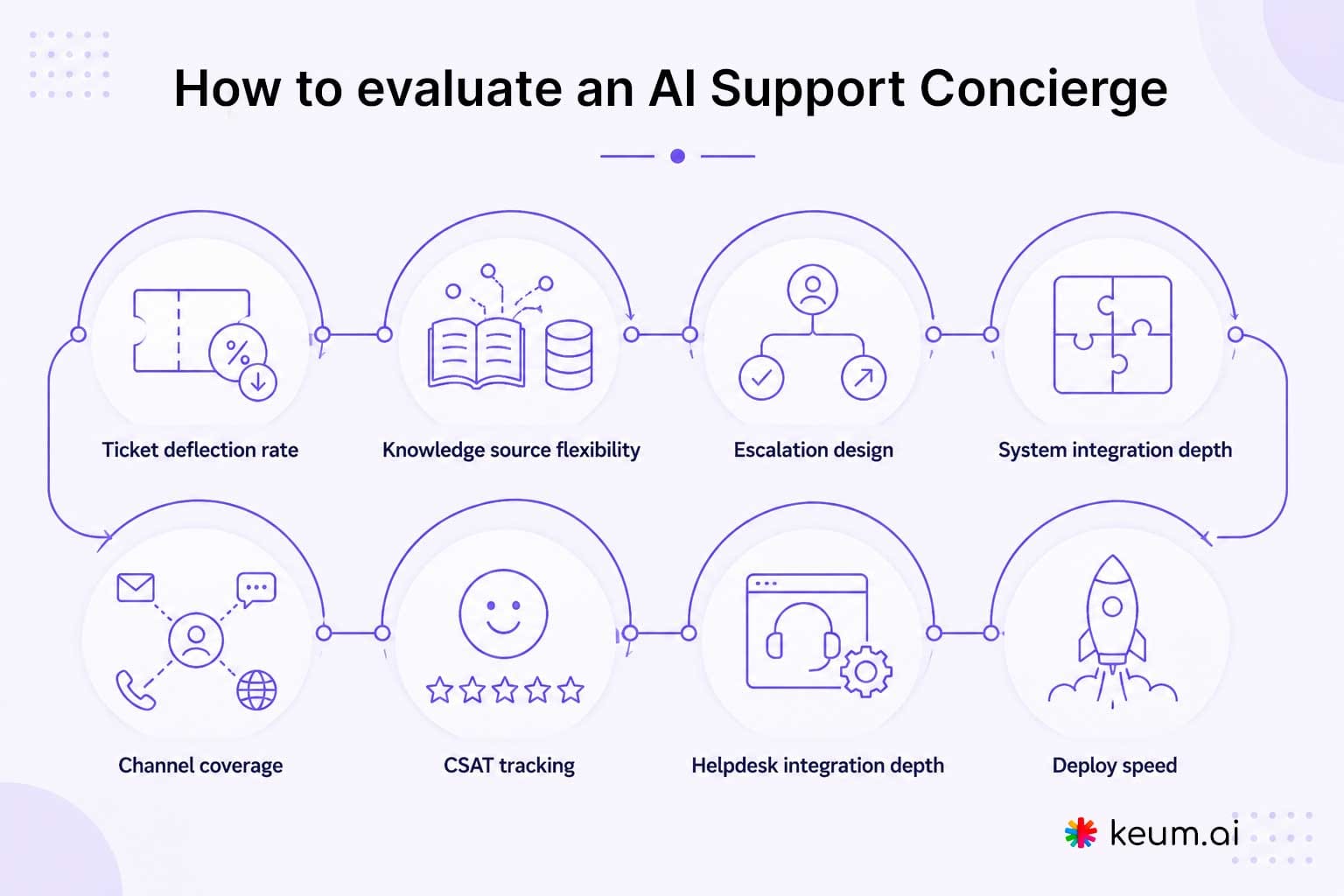
These are the criteria that determine whether a tool actually improves your support operation.
The four numbers that define support performance
Every evaluation criterion maps to one of four metrics: ticket deflection rate (Tier 1 queries resolved automatically), resolution rate (queries closed without escalation), first contact resolution rate (issues closed on the first interaction), and CSAT score (satisfaction after each interaction). If a tool cannot report on all four, it is a chatbot, not a support concierge.
- Ticket deflection rate: Does the vendor publish a deflection rate with a defined methodology? Ask what counts as a deflection and how it is measured.
- Knowledge source flexibility: Can the agent be trained on your existing docs, SOPs, FAQs, and product content without developer involvement?
- Escalation design: When the agent cannot resolve an issue, does it route with full context or drop the customer into a generic queue?
- System integration depth: Can the agent connect to your CRM, order management, billing, and booking systems to retrieve live customer data and execute actions? This is the defining difference between a FAQ bot and a support concierge and often offered as part of custom integration or professional services.
- Channel coverage: Does it work only on your website, or across phone, WhatsApp, email, QR, and in-person?
- CSAT tracking: Is satisfaction collected automatically after each resolution, or do you need a separate survey layer?
- Helpdesk integration depth: Does your support team receive a structured context handoff — or a raw chat log to parse?
- Deploy speed: Can a lean team go live without ongoing engineering support?
Simple ROI check
If your team resolves 1,000 Tier 1 tickets per month at $10–$20 per ticket in agent time, that is $10,000–$20,000 per month in manual resolution cost. An AI Support Concierge deflecting 60–80% of that volume pays for itself immediately — and the free-forever plan offered by keum.ai means you can measure the impact before spending anything.
Frequently asked questions
What is an AI Support Concierge?
An AI support agent that goes beyond Q&A — it triages inbound queries, retrieves live customer data from connected systems, resolves Tier 1 tickets automatically, escalates with full context, and tracks CSAT across every channel. Where a standard AI support agent handles one function, an AI Support Concierge covers the full resolution workflow.
How is AI Support Concierge different from an AI chatbot?
A chatbot answers questions from a script or document. This resolves issues — it retrieves live data from your systems, executes actions on the customer’s behalf, escalates with structured context, collects CSAT, and integrates with your CRM. The difference is between answering a question and closing a support issue.
Can AI Support Concierge connect to my existing systems?
Yes. keum.ai’s AI Support Concierge connects to your CRM, order management, billing, scheduling, and operational systems. When a customer asks about their order, account, or appointment, the agent retrieves actual live data. It can also log cases, update records, book appointments, and trigger workflows inside connected systems.
How is AI Support Concierge different from a help desk like Zendesk?
A help desk manages and routes tickets after they arrive. An AI Support Concierge resolves the majority of Tier 1 tickets before they become tickets — at the moment the query is raised. The two are complementary: the AI Support Concierge deflects routine volume; the help desk manages what remains.
How many tickets can AI Support Concierge resolve automatically?
With a well-maintained knowledge base, the agent is designed to resolve up to 80% of common Tier 1 queries — billing clarifications, how-to questions, policy queries, and account questions with a clear answer in your approved content. Remaining issues escalate with full conversation context attached.
Which channels should AI Support Concierge support?
Web chat, voice/phone, WhatsApp, email, QR codes, and kiosk deployments — covering digital channels and offline touchpoints. Conversations maintain context across channels, so a customer who starts on your website can continue on WhatsApp without repeating themselves.
Is AI Support Concierge suitable for small businesses?
Yes — startups and small businesses often benefit the most. They face the same 24/7 customer expectations as larger teams but cannot staff around the clock. keum.ai deploys in under 10 minutes, requires no developer, and offers a free forever subscription with no credit card required.
What happens when the AI cannot resolve an issue?
It escalates to a human agent with the full conversation history and a structured context bundle — the agent never starts from scratch. Live human chat handoff moves the conversation instantly for teams needing real-time transfer. And the AI Agent moves from supporting the customer to assisting the human agent with helpful information and draft responses.
What should I measure after launch?
Ticket deflection rate, CSAT score, outcomes and escalation rate. Together these tell you whether the agent is resolving what customers actually bring — and where knowledge base or system integration gaps are costing resolution quality.
Implementation checklist
Most teams are live in under 10 minutes. This covers what to prepare, configure, and review from day one.
- Connect your knowledge sources — product docs, SOPs, FAQs, help articles, and plain-text support policies.
- Connect your live operational systems — CRM, order management, booking platform, billing system. This is what enables order status lookups, account queries, and appointment actions with real customer data.
- Define resolution scope — which query types can AI resolve fully, and which must escalate. Common Tier 1 categories: billing clarifications, how-to questions, account queries, appointment questions, and policy FAQs.
- Configure escalation destinations — set where each escalation category routes: support inbox, CRM task, live agent handoff, or calendar booking.
- Set CSAT capture rules — confirm satisfaction scoring is active after each resolved interaction.
- Connect your CRM or help desk — HubSpot, Salesforce, Zoho, Freshdesk, or Zendesk — so resolution summaries route automatically.
- Test your top 20 support questions — confirm every answer is accurate and within compliance scope before going live.
- Review unresolved queries weekly — use the support dashboard to identify gaps, approve corrections, and update the knowledge base.
About this guide
This article was reviewed by the keum.ai product team and written to help buyers understand where an AI Support Concierge fits in a modern support stack. It is intended as an educational guide first and a product-led buying resource second.
This article may be freely linked to and cited with attribution.
Ready to resolve Tier 1 support tickets automatically?
keum.ai’s AI Support Concierge resolves queries, retrieves live customer data from your systems, collects CSAT, and escalates with context – across web, phone, WhatsApp, email, QR, and kiosk. Free forever, no credit card required.